
An order exists in WooCommerce but never appears in the ERP. Another appears twice. Both incidents can have the same root cause: the integration treats an event being emitted, a message being received and a business operation succeeding as the same thing. Track those three stages separately.
This guide covers outgoing WooCommerce webhooks sent to your applications, not incoming notifications from a payment provider. For the broader architecture, see our guide to connecting WooCommerce to a CRM or ERP. Here, the aim is to make failures understandable and recovery safe.
Missing order: establish a timeline before retrying
Record the order ID, source store, status and timestamps with their time zones. Distinguish an order being created from one becoming eligible for export: eligibility depends on payment methods and operational checks. An order.created event is not proof of payment.
- In WooCommerce → Settings → Advanced → Webhooks, check the status, topic and delivery URL. Repeated delivery failures can disable a webhook.
- In WooCommerce → Status → Logs, filter by
webhooks-delivery. Locate the attempt, HTTP response and duration. An empty log alone does not prove that no event occurred. - At the receiver, trace receipt, validation, persistence and the eventual result. A
200from a login page or proxy does not prove that an ERP order was created. - If no delivery appears, check scheduled actions and queue delays too. If a delivery exists but never reaches the application, investigate DNS, TLS, firewall rules, redirects and HTTP routing.
The WooCommerce documentation describes these screens and failure-based disabling. Do not assume that re-enabling the webhook will replay every order from the outage: plan an explicit catch-up.
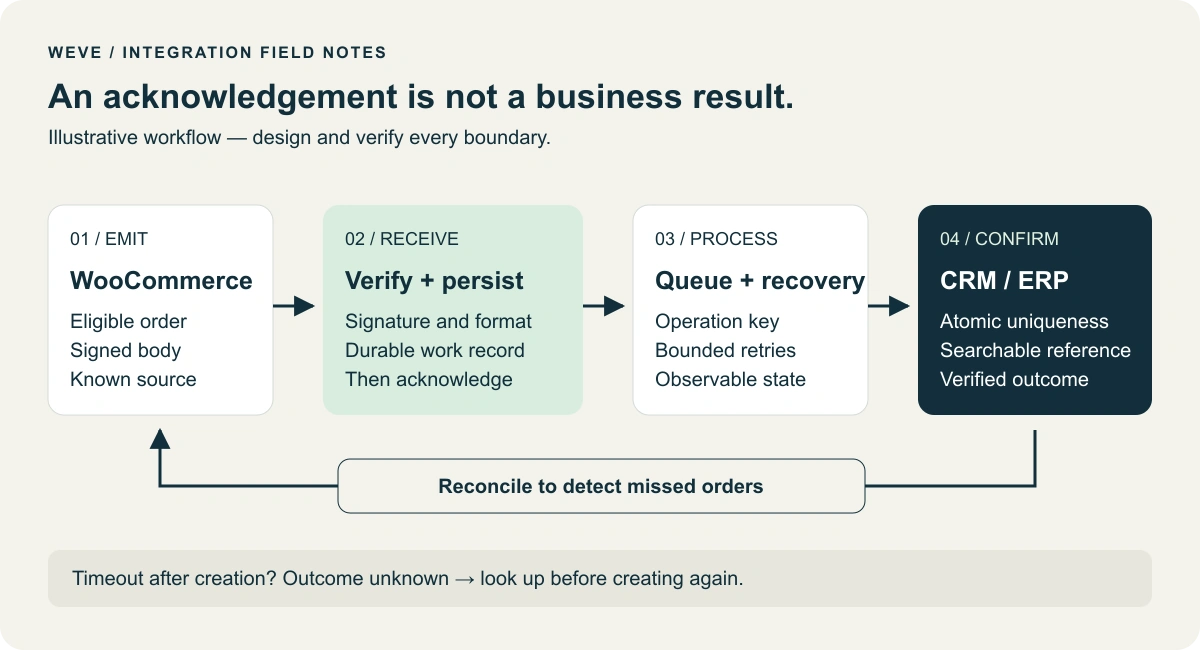
Classify the failure before choosing an action
An authentication rejection, an unknown reference and a temporary outage need different responses. Also record which system returned the status: the webhook response and the ERP response belong to separate exchanges. Keep a correlation identifier across those stages, with restricted access to logs.
- 401 or 403: check permissions and configuration; repeating an unchanged request will not restore access.
- 429: respect rate limits and the
Retry-Afterindication when supplied. - Validation error: correct the data or mapping before replay.
- Timeout or 5xx: consider spaced retries, but first address any unknown outcome.
Verify the signature against the received bytes
With the standard configuration, WooCommerce signs the body using a Base64-encoded HMAC-SHA256, sent in X-WC-Webhook-Signature. Calculate the expected signature from the raw body, before decoding and re-encoding JSON: different whitespace or property ordering changes the signed bytes. In PHP, compare it using hash_equals(), with the expected value first.
Load the secret from server-side configuration associated with a known source, not from a URL supplied by the message. Then validate body size, JSON and schema. A valid signature authenticates the message for that secret; it does not prevent replay. Keep secrets and full customer records out of URLs and logs.
Acknowledge only after durable persistence
The receiver should durably persist validated work before promptly returning a successful acknowledgement. ERP processing can then happen in the background. Acknowledging first creates a loss window; waiting for a slow chain of APIs increases timeout risk. If persistence fails, do not return a misleading success response.
Within WordPress, Action Scheduler can run background jobs. Call its API after initialization, and check scheduling results, failed actions and the oldest pending job. Its unique option concerns scheduling; it does not, by itself, make a remote creation idempotent.
If recording work and scheduling it are separate writes, account for a crash between them. Persisted work that was never scheduled must not become invisible: a sweep of pending records can put it back on the queue. Server restarts become an acceptance scenario rather than an overlooked assumption. Also define an appropriate retention period for message bodies and the personal data they contain.
Prevent duplicates when the ERP response is lost
The difficult case is an ERP that creates the order before the connection drops and the integration receives its response. A timeout then means outcome unknown, not “nothing was created”. Blindly creating the order again can duplicate the sale.
Use a stable operation key, such as store-a:order:1842:create. The target must enforce it atomically, using a unique constraint or a documented idempotency mechanism. An “already exists?” check followed by an insert still races when two workers run together. Also persist the mapping to the remote ID.
If the target cannot guarantee uniqueness, look up the external reference after an unknown outcome and provide manual resolution for ambiguous cases. A local lock alone cannot cover a crash after remote creation. Updates and refunds need separate keys and rules; a single key per order would suppress legitimate changes.
Local demonstration: two deliveries, one creation
The following example runs on PHP 8 with PDO SQLite. Run it only from the command line, in a test file outside the public web directory. It calls no services, purchases nothing and uses an in-memory database. The second pass simulates redelivery after a lost response. This lab illustrates a target-side constraint, not a production receiver or durable queue.
<?php
$secret = random_bytes(32);
$body = '{"id":1842,"status":"processing"}';
$signature = base64_encode(hash_hmac('sha256', $body, $secret, true));
$db = new PDO('sqlite::memory:');
$db->setAttribute(PDO::ATTR_ERRMODE, PDO::ERRMODE_EXCEPTION);
$db->exec('CREATE TABLE orders (external_ref TEXT PRIMARY KEY)');
$insert = $db->prepare(
    'INSERT INTO orders (external_ref) VALUES (?)
     ON CONFLICT(external_ref) DO NOTHING'
);
foreach ([1, 2] as $attempt) {
    $expected = base64_encode(hash_hmac('sha256', $body, $secret, true));
    if (!hash_equals($expected, $signature)) {
        throw new RuntimeException('Invalid signature');
    }
    $insert->execute(['demo-store:order:1842:create']);
}
echo 'orders=' . $db->query('SELECT COUNT(*) FROM orders')->fetchColumn() . PHP_EOL;
$changed = str_replace('1842', '1843', $body);
$expected = base64_encode(hash_hmac('sha256', $changed, $secret, true));
echo 'tampered=' . (hash_equals($expected, $signature) ? 'accepted' : 'rejected') . PHP_EOL;
Expected output: orders=1, then tampered=rejected. This checks a sequential duplicate and a modified body. Concurrency, restart recovery and the real target API still need staging tests; this simulation does not prove those properties.
Make acceptance tests deterministic
- Two concurrent workers: exactly one business creation, without suppressing a different order.
- Connection lost after remote creation: recovery finds that creation rather than adding another.
- ERP outage followed by recovery: work remains stored and resumes under a bounded, observable retry policy.
- Invalid signature: no accepted work and no commercial data created.
- Old notification after a newer update: no silent rollback to an earlier status; check current state or enforce a versioning rule.
- Unknown product reference: explicit failure, not an improvised substitution.
Reconcile orders to detect missed events
Periodically compare eligible store orders with references recorded at the destination. Follow pagination and use an overlapping window to tolerate delays and clock differences. Catch-up must reuse the normal flow’s operation keys. Start with a discrepancy report and validate its scope before sending anything.
Finally, monitor delays, blocked operations, unknown outcomes and the last successful reconciliation. Document who may replay which operations. For a custom WooCommerce integration, this recovery procedure matters as much as the first successful delivery. Our e-commerce and private-content case study describes a real scope combining a store, an internal CRM and access rights. Tell us about your workflow and the failure you encountered to scope a diagnostic.
Technical references: WooCommerce webhooks, the WC_Webhook implementation, Action Scheduler API and PHP HMAC. Checked on 20 October 2026; adapt checks to your versions and extensions.