
A WooCommerce CRM or ERP integration should transfer orders and customers, synchronize the agreed data and recover from errors without creating duplicates. Choosing a connector, automation platform or custom integration depends on business rules, exceptions and the team’s ability to monitor the exchanges.
Connecting WooCommerce to a CRM, an ERP or a business API removes the need to enter the same information again. But one successfully transferred order does not prove the integration works. You also need to know what happens when the ERP does not respond, a customer checks out as a guest, or a sale is refunded.
The practical test comes down to one question: can your team trace every transfer and recover from a failure without recreating orders by hand?
Follow an order through to fulfilment
Take a fictional example: order #1842 contains two spare parts, a discount and a delivery charge. The customer pays online. The ERP needs the order to organise fulfilment, while the CRM needs to retain the customer's purchase history.
Before installing a connector, decide when the order is ready to be sent. It may still be unpaid when first created. After payment, it may be ready for fulfilment or require a check under your business rules. Orders paid by bank transfer may follow a different process. The trigger should therefore reflect how your business works, rather than simply use the first available event.
Next, specify what the ERP expects: product variation codes, quantities, the delivery address, discounts, tax, shipping charges and the payment method. An order marked as received but containing an unknown product is still of no use to the fulfilment team. Acceptance testing must check the result in the business software itself, not just the technical response from its API.
Define the source of truth for each field
Two-way synchronisation sounds reassuring. Without clear rules, however, it can create a loop: the shop changes a value, the ERP overwrites it, and the shop sends that change back again.
It is better to assign ownership field by field. In our example, the ERP could manage product codes and stock, WooCommerce the catalogue copy and images, and the CRM the information used for sales follow-up. This division is a choice to confirm for your own business.
| Data | Rule to agree before development |
|---|---|
| Product and variation | Which stable identifier links the online product to its ERP record? |
| Stock | Who calculates the quantity available to sell, accounting for reserved stock? |
| Price and promotion | Who sets the price, and how does the ERP retain the discount actually applied? |
| Customer | How are customer accounts, guest purchases and existing contacts matched? |
| Order | Who retains the original sale and any subsequent changes? |
| Invoice and credit note | Which system issues them, and how are their references sent back to the shop? |
In particular, you must still be able to explain the price the customer paid. Recalculating an old order using the ERP's current prices can change its total. Likewise, an address updated in the CRM should not silently overwrite the address on an order that has already been prepared.
Plugin, no-code or custom integration: choose for your exceptions
A standard connector is often the first option to consider when your ERP has a maintained integration and your processes fit its intended scope. Ask for a demonstration using your product variations, discounts and refunds. Also check supported versions, logs, recovery after a failure and access to support. A feature list does not always reveal the limitations.
A no-code platform can be a good fit for creating a CRM contact, notifying a team or synchronising a small set of fields. It can also handle larger data flows if it provides the necessary guarantees. The deciding factor is who can diagnose a failure, retry an operation without creating duplicates and keep costs under control as volumes or the number of steps increase.
A custom integration makes sense when several systems are involved, their formats differ or your business has specific rules: trade pricing, partial fulfilment, catalogues shared across multiple sites or digital products with access permissions. In return, it requires a maintenance budget and documentation that another team can use.
The right choice covers your everyday use cases and your exceptions at a cost you can afford. A plugin with a small amount of custom processing may be enough; a fully custom integration is not automatically necessary.
For any ERP, ask the vendor or integrator for API documentation, a test environment, API rate limits, the objects you can access and a way to find an order by its external reference. Some systems use import files instead. Assess that option against your acceptable processing delay and the error feedback available.
Give APIs and webhooks different roles
The WooCommerce REST API lets you read and update data such as orders, products and customers. A webhook notifies another application of an event. The two can work together: the event triggers the work, then the integration checks or retrieves the data it needs. These mechanisms are described in the official documentation for the WooCommerce API and webhooks.
For order #1842, the key is to persist the work that needs to be done. The ERP can be unavailable for a few minutes without the order disappearing from the list awaiting transfer. A queue allows the transfer to run in the background while retaining its status.
In WordPress, Action Scheduler provides a mechanism for scheduled tasks and logging. Installing it alone does not guarantee that transfers will run on time: queue execution and delays need monitoring. Retry rules and duplicate detection still have to be designed as part of the integration.
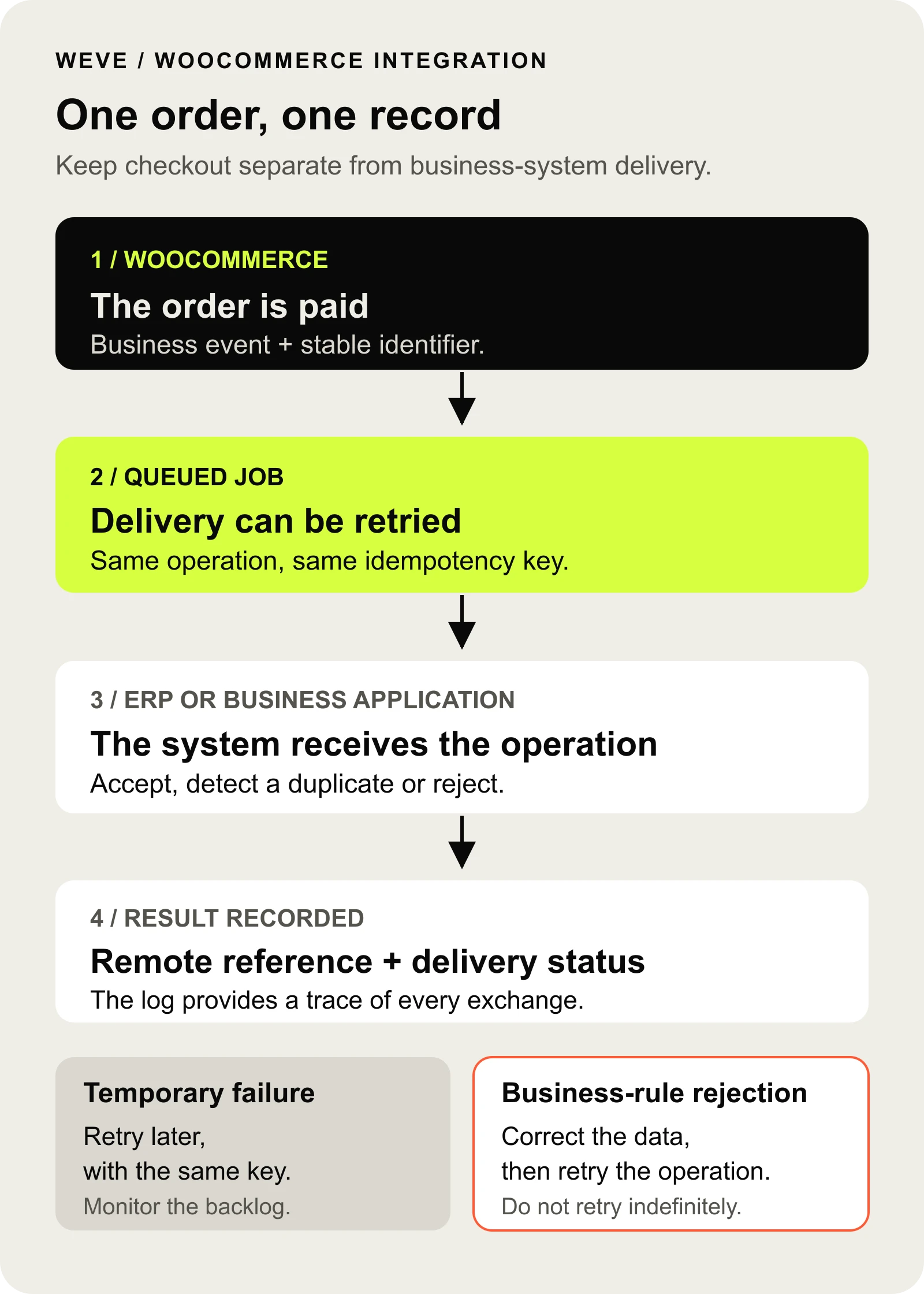
Example of an order flow, to be adapted to the company's tools and processes.
Retry without creating a second order
The ERP receives order #1842 and creates it. But its response does not arrive in time, so the integration sees the transfer as a failure. Sending the order again without checking could create a second sale.
This is the role of idempotency: repeating the same operation must produce the same result without repeating its business effect. You can send a reference made up of the shop's identity, the order and the operation type. The ERP must recognise that reference or let you look up the record already created. Adding an identifier to a message is not enough if nothing checks it at the receiving end.
The link between the WooCommerce order and the ERP order is then retained. A refund has its own identity and must not be confused with another attempt to send the original sale.
Different errors call for different responses. Temporary unavailability may justify retries at increasing intervals. An unknown product code needs correcting. A rejected access key should alert the person responsible for the connection. Once a defined threshold is reached, the operation must remain visible and only resume under controlled conditions.
Finally, regular reconciliation compares the orders due to be sent with those actually received. A webhook may fail or be disabled after delivery failures. Reconciliation helps detect missed events instead of relying solely on notifications.
Plan for refunds, stock and digital products
A partial refund is a useful test case. The customer returns just one of the two parts: you need to retain the sale, send the relevant refund and apply the agreed restocking rule. Refunding a payment does not automatically mean the product is back in the warehouse. WooCommerce exposes separate refund objects through its dedicated API.
For stock, hourly synchronisation may suit some catalogues but cause overselling of a scarce item. Set a maximum update delay and account for stock already reserved by each system. If the ERP temporarily sends a stock level that does not include an online sale, it must not make an already sold unit available again. Test this scenario with simultaneous orders.
Product variations need explicit mappings. A missing product code should block the affected transfer and flag the problem, rather than substitute a different product considered close enough.
For digital content, the question is access rights: which purchase grants access, for how long, and what happens to that access after a refund? Document these rules separately from the transfer to the CRM or accounting system.
Check access permissions and shop compatibility
API keys stay on the server, in storage designed for secrets. They belong to a dedicated account and are limited to the permissions required. WooCommerce distinguishes read, write and read/write access, subject to the associated user's capabilities. These access levels are detailed in its authentication documentation.
The receiving system must verify webhook signatures. Logs should identify the order and the error without unnecessarily storing all of the customer's personal information.
Another point to check is HPOS compatibility: WooCommerce's dedicated order storage tables. An extension that accesses the old WordPress tables directly may read or write in the wrong place. For in-house development, WooCommerce recommends its order management APIs. For a connector, ask for compatibility to be verified against your setup. The HPOS documentation for extensions explains this distinction.
Acceptance testing that proves your team can use the integration
Start validation with a small, representative set of orders in a test environment. For each case, check the line items, amounts, references and statuses in both systems.
| Test scenario | Expected result |
|---|---|
| Paid order with a discount and shipping charges | One ERP order with matching amounts |
| The same event received twice | No duplicate sale |
| Response lost after the ERP creates the order | The existing order is found without creating another sale |
| ERP unavailable, then restored | Pending operations are retained and processed when service resumes |
| Unknown product variation or partial refund | A clear error message or processing that follows the agreed rule |
Agree monitoring thresholds with the team: acceptable delays, the age of the oldest pending operation and errors that need intervention. An alert should identify the affected flow and who is responsible for it. A vague API error message often leaves everyone waiting for someone else to act.
How WEVE can help define the scope
In the case study E-commerce ecosystem and private content, WEVE extended a WordPress and WooCommerce setup with an internal CRM and structured sales data. The scope also included protecting private media and downloads.
These two areas involve different responsibilities: retaining sales information that teams can use, and granting customers the correct access rights. Bringing them together in one project requires understanding the product beyond the online shop.
For your project, the first useful deliverable is a map of the data flows: which system is the source of truth, when a transfer starts, how its outcome is checked and who steps in if it fails. This helps you choose between a connector, automation and custom development, then define a scope that can be estimated.
Already investigating a failure? Our guide to WooCommerce webhooks, missing orders and duplicates provides diagnostic steps and a testable local example.
Does your team re-enter orders or regularly fix synchronisation problems?